Indispensable tool of the day: thefuck

Thefuck is a magnificent app which corrects your previous console command.

Thefuck is a python tool, hosted on github, which looks at your previous command and tries to correct it. You of course invoke it after a typo for instance, by typing fuck in your terminal.

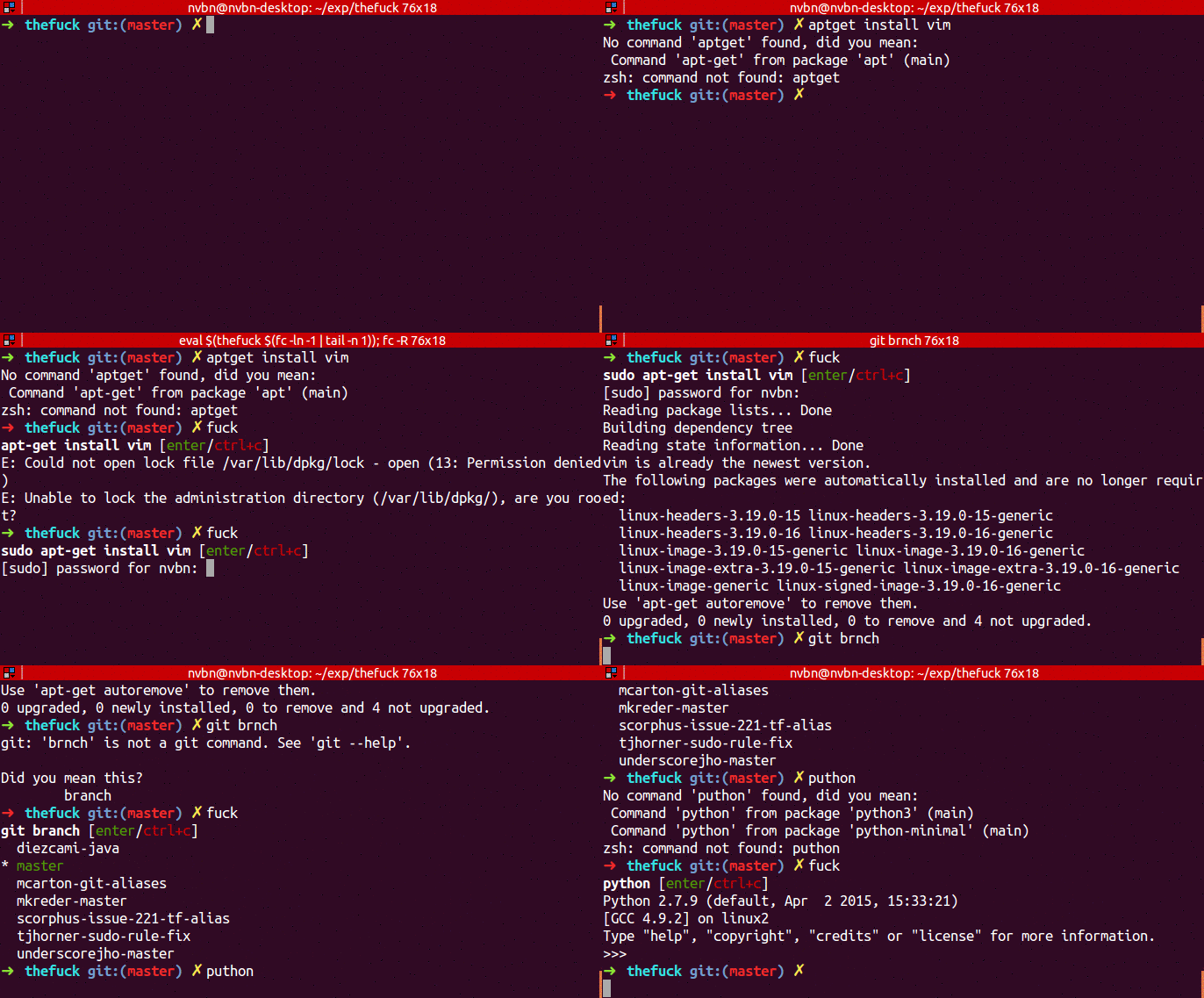
A few examples in image, from the developer himself:

thefuck in action

A few more examples:

Adds sudo for you:

~> apt-get install thefuck 
E: Could not open lock file /var/lib/dpkg/lock - open (13: Permission denied)
E: Unable to lock the administration directory (/var/lib/dpkg/), are you root?
~> fuck
sudo apt-get install thefuck [enter/↑/↓/ctrl+c]
Reading package lists... Done

Corrects your git branch syntax (this is my main use of thefuck):

~/gits/lomignet-apt> git push
fatal: The current branch newfeature has no upstream branch.
To push the current branch and set the remote as upstream, use

  git push --set-upstream origin newfeature

~/gits/lomignet-apt> fuck
git push --set-upstream origin newfeature [enter/↑/↓/ctrl+c]
Total 0 (delta 0), reused 0 (delta 0)
To git@github.com:lomignet/lomignet-apt.git
 * [new branch] newfeature -> newfeature
Branch newfeature set up to track remote branch newfeature from origin.

The installation is trivial as the package is uploaded to the python package index:

pip install thefuck

To then have the command available, add to your .bashrc or whichever your startup script is:

eval $(thefuck --alias)

In the background, thefuck has a set of known rules which you can find in the readme. If those rules are not comprehensive enough for you, you can write your own.

Restart Mongodb with not enough nodes in a replica set

The context could be a virtualised cluster, where an hypervisor went suddenly down. 2 of your Mongo replicas are unavailable, only 1 is left, which then of course drops back to being secondary and read only.

You want to have this server running alone for a while while the others come back online, as you decide that it is better to have potential small inconsistency instead of not running for a few hours. The thing is that this last server will complain that the rest of the set is not available. To get it started again, you just need to make it forget about the rest of the set.

  1. Switch the service off
    service mongodb stop
  2. Remove the line replSet from your /etc/mongodb.conf
  3. Restart the service
    service mongodb start

    Mongo will complain:

    mongod started without --replSet yet 1 documents are present in local.system.replset
     [initandlisten] ** Restart with --replSet unless you are doing maintenance and no other clients are connected.
     [initandlisten] ** The TTL collection monitor will not start because of this.
     [initandlisten] ** For more info see http://dochub.mongodb.org/core/ttlcollections
  4. Remove the offending document in system.replset from the mongoshell
    // will give you one document back
    db.system.replset.find()
    // remove all documents (there is only one)
    db.system.replset.remove({})
    // check resultset is empty
    db.system.replset.find()
    
  5. Restart mongo
    service mongodb stop
    service mongodb start
  6. Once the other nodes are up, add again the replSet line in /etc/mongodb.conf and restart the service.

New puppet apt module, now with better hiera!

The puppet apt module from puppetlabs works great, but has one big issue. You can define sources (and keys, settings and ppas) from hiera, but only your most specific definition will be used by the module, as only the default priority lookup is done. This means a lot of cut & paste if you want to manage apt settings across multiple environments or server roles. This is known, but will not be fixed as it is apparently by design.

Well, this design did not fit me, so I forked the puppetlabs module, updated it to enable proper hiera_hash look up, and published it to the puppet forge. There is no more difference with the original, but it does simplify my life a lot. Now if you define multiple sources in your hierarchy, for instance at datacenter level:

apt::sources:
 'localRepo':
   location: 'https://repo.example.com/debian'
   release: '%{::lsbdistcodename}'
   repos: 'main contrib non-free'

and at server level:

apt::sources:
  'puppetlabs':
    location: 'http://apt.puppetlabs.com'
    repos: 'main'
    key:
      id: '47B320EB4C7C375AA9DAE1A01054B7A24BD6EC30'
      server: 'pgp.mit.edu'

you will nicely have both sources in sources.list.d, instead of only having the one defined at server level.

You can find the source on github, and can download the module from the puppet forge. Installing it is as simple as:

puppet module install lomignet-apt

Better sudo messages

There is a nice feature to increase the “usefulness” of your error message when a user enters a wrong password.

Just add to /etc/sudoers the following line:

Defaults insult

et voilà:

admin@localhost:~$ sudo ls
[sudo] password for admin: 
I can't hear you -- I'm using the scrambler.
[sudo] password for admin: 
Have you considered trying to match wits with a rutabaga?
[sudo] password for admin: 
Wrong! You cheating scum!
[sudo] password for admin: 
You type like I drive.
[sudo] password for admin: 
Your mind just hasn't been the same since the electro-shock, has it?
[sudo] password for admin: 
stty: unknown mode: doofus
[sudo] password for admin: 
Listen, burrito brains, I don't have time to listen to this trash.
[sudo] password for admin: 
You speak an infinite deal of nothing
[sudo] password for admin: 
That's something I cannot allow to happen.
[sudo] password for admin: 
I feel much better now.
[sudo] password for admin: 
He has fallen in the water!
[sudo] password for admin: 
I don't wish to know that.

The only thing if you set sudo up that way is that you should expect a big surge in security logs once you users discover it and start playing with it.

Writing your first Sublime Text 3 plugin

Sublime text is an amazing text editor. Sleek, full of features, multi platform, very usable without a mouse. It is my editor of choice since a few years already.

One of its great advantages is that it is extensible in python, which makes it very easy to tweak.

I recently played with a vagrant box in which I needed to update a file. The file was mounted inside vagrant, but needed to be copied elsewhere inside the box, meaning it had to be copied manually every time I saved it. As I am very lazy (laziness drives progress, one of the favorite saying of my director of studies) I wanted to do that automagically. This is a very simple job, ideal for a first plugin.

So, where to start? Well, it is quite easy: on the menu bar click tools, then new plugin, Et voilà, you have your first plugin. Congratulations!

import sublime, sublime_plugin
class ExampleCommand(sublime_plugin.TextCommand):
 def run(self, edit):
 self.view.insert(edit, 0, "Hello, World")

This is a nice skeleton, but it does no go very far.

As I want to have an action on save, I needed to have an event listener plugin, in my case listening to a save event. I wanted to act after the event (use the file only after it was written). The API says that on_post_save_async is the best event for me, as it runs in a separate thread and is non blocking.

import sublime
import sublime_plugin


class UpdateOnSave(sublime_plugin.EventListener):

    def on_post_save_async(self, view):
        filename = view.file_name()
        # do something with the filename

Good, this is getting somewhere! All the base is present, now I just had to do something with this file.

The something is that case was a kind of subprocess call, to use vagrant ssh. Sublime already has a wrapper around subprocess, named exec. Exec can run in 2 contexts, view (basically the sublime buffer you are editing) to run TextCommands or window (sublime itself) to run all type of commands. Finding in which context to run your command is a bit of trial and error, but once done the last bit of the plugin is thus a trivial (once you know it) call to exec:

# please always use shlex with subprocess
import shlex
import sublime
import sublime_plugin
import os


class UpdateOnSave(sublime_plugin.EventListener):

    def on_post_save_async(self, view):
        filename = view.file_name()
        savedfile = os.path.basename(filename)
        saveddir = os.path.dirname(filename)

        # write in sublime status buffer
        sublime.status_message('Manually saving ' + filename)

        source_in_vagrant = '/vagrant/' + savedfile
        dest_in_vagrant = '/project/' + savedfile

        cmd_cp = "vagrant ssh -c 'sudo cp {0} {1}'".format(source, dest)

        view.window().run_command('exec', {
            'cmd': shlex.split(cmd_cp),
            'working_dir': saveddir,
        }
        )

Good, your plugin is ready! The last question is to know where to put it to have it actually used. With Sublime 3 under Linux, you need to have it in $HOME/.config/sublime-text-3/Packages/User. Note that it must be named something.py, with the .py extension, not the .py3 extension, or it would not be found.

You can find the plugin on github.

Puppet error messages and solutions

This is a collection of error messages I got while setting up a puppet infrastructure and testing modules, as well as their reasons ans solutions.

Failed to load library ‘msgpack’

Message

On an agent:

Debug: Failed to load library 'msgpack' for feature 'msgpack'
Debug: Puppet::Network::Format[msgpack]: feature msgpack is missing

on the master:

Debug: Puppet::Network::Format[msgpack]: feature msgpack is missing
Debug: file_metadata supports formats: pson b64_zlib_yaml yaml raw

Context

This happens when you run puppet agent, for instance.

Reason

msgpack is an efficient serialisation format. Puppet uses is (experimentally) when communicating between master and agent. This format requires a gem, which if not installed will give this debug message. This is completely harmless, it just pollutes your logs.

Fix

Just install the msgpack ruby gem. Depending on your system, you can

#debian based:
apt-get install ruby-msgpack
#generic
gem install msgpack

This immediately removes the debug messages. To actually use msgpack, you need to add in the [main] or [agent] section of puppet.conf the line:

preferred_serialization_format =  msgpack

Could not retrieve information from environment

Message

Error: /File[/var/lib/puppet/facts.d]: Could not evaluate: Could not retrieve information from environment $yourenvironment source(s) puppet://localhost/pluginfacts

Context

Puppet agent run.

Reason

If no module has a facts.d folder, puppet will throw this error. This is an actual bug in puppet, at least version 3.7.3.

Fix

Option 1: Just discard. This is shown as an error, but has no impact and the run will carry on uninterrupted.

Option 2: actually create a facts.d folder in a module.

Could not find data item classes in any Hiera data file

Message

Error: Could not retrieve catalog from remote server: Error 400 on SERVER: Could not find data item classes in any Hiera data file and no default supplied on node aws-nl-puppetmaster.dp.webpower.io

Context

Your puppet tests were all working fine from vagrant. You just installed a puppet master and the first agent run gives you this error.

Reason

Check your hiera.yaml file (in /etc/puppet/hiera.yaml, /etc/puppetlabs/puppet/hiera.yaml or pointed by hiera_config from your puppet.conf). There is a :datadir section, telling puppet where to find hiera data. If the path there is absolute, then it should directly point to the directory. If it is relative, then it works only under vagrant and is based on puppet.working_dir.

Fix

Many options are possible.

  • Use a common absolute path everywhere.
  • Put the directory, maybe via a link, in its default location.
  • Puppet can interpolate variables when reading datadir, so if your issue is due to different environments, you could use a path like
    “/var/hieradata/%{::environment}/configuration”

Note that if you change hiera.yaml, you need to reload the puppet master as hiera.yaml is only read at startup.

No such file or directory @ dir_s_rmdir

Message

Error: Could not retrieve catalog from remote server: Error 400 on SERVER: Failed when searching for node $nodename: No such file or directory @ dir_s_rmdir - /var/puppet/hiera/node/$nodename.yaml20150812-5415-1802nxn.lock

Context

Puppet agent run

Reason

  1. Puppet master tries to create a file in a directory he does not own, and has thus no permission.
  2. Puppet tries to create a file or directory whereas the parent does not exists.
  3. The partition where puppet tries to create a lock file is full.

Fix

  1. With the path given in the example error message:
    chown -R puppet:puppet /var/puppet/hiera
  2. Make sure the parent is created in the manifest as well

This ‘if’ statement is not productive

Message

 This 'if' statement is not productive.

followed by some more explnation depending on the context.

Context

Puppet agent run

Reason

Puppet does not want to leave alone, and pretends to know better than me. I might want to have a if (false) {…} or if (condition) {empty block} for whatever reasons, but no, puppet very violently and rudely bails out. There is a bug discussion about it as well as a fix to change the wording, but the behaviour will stay.

Fix

Comment out what puppet does not like.

sslv3 alert certificate revoked or certificate verify failed

Message

SSL_connect returned=1 errno=0 state=SSLv3 read server session ticket A: sslv3 alert certificate revoked

or

Wrapped exception:
SSL_connect returned=1 errno=0 state=unknown state: certificate verify failed: [self signed certificate in certificate chain for /CN=Puppet CA: puppetmaster.example.com]

Context

Puppet agent run

Reason

You probably revoked or clean certificates on the puppet master, but did not inform the agent about it. or maybe you are now pointing to a new puppetmaster.

Fix

You can fix this by cleaning the agent as well:

sudo rm -r /etc/puppet/ssl
sudo rm -r /var/lib/puppet/ssl

Easily simulating connection timeouts

I needed an easy way to simulate timeout when connected to a REST API. As part of the flow of an application I am working on I need to send events to our data platform, and blocking the production flow ‘just’ to send an event in case of timeout is not ideal, and I needed a way to test this.

I know there are a few options:

  • Connecting to a ‘well known’ timing out url, as google.com:81, but this is very antisocial
  • Adding my own firewall rule to DROP connection, but this is a lot of work (yes, I am very very lazy and I would need to look up the iptables syntax)
  • Connecting to a non routable IP, like 10.255.255.1 or 10.0.0.0

All those options are fine (except the first one, which although technically valid is very rude and no guaranteed to stay), but they all give indefinite non configurable timeouts.

I thus wrote a small python script, without dependencies, which just listens to a port and makes the connection wait a configurable amount of seconds before either closing the connection, either returning a valid HTTP response.

Its usage is very simple:

usage: timeout.py [-h] [--http] [--port PORT] [--timeout TIMEOUT]

Timeout Server.

optional arguments:
 -h, --help show this help message and exit
 --http, -w if true return a valid http 204 response.
 --port PORT, -p PORT Port to listen to. Default 7000.
 --timeout TIMEOUT, -t TIMEOUT
 Timeout in seconds before answering/closing. Default
 5.

For instance, to wait 2 seconds before giving an http answer:

./timeout.py -w -t2

Would give you following output if a client connects to it:

./timeout.py -w -t2
Listening, waiting for connection...
Connected! Timing out after 2 seconds...
Processing complete.
Returning http 204 response.
Closing connection.

Listening, waiting for connection...

This is the full script, which you can find on github as well:

#!/usr/bin/env python
import argparse
import socket
import time


# Make the TimeoutServer a bit more user friendly by giving 3 options:
# --http/-w to return a valid http response
# --port/-p to define the port to listen to (7000)
# --timeout/-t to define the timeout delay (5)

parser = argparse.ArgumentParser(description='Timeout Server.')
parser.add_argument('--http', '-w', default=False, dest='http', action='store_true',
                    help='if true return a valid http 204 response.')
parser.add_argument('--port', '-p', type=int, default=7000, dest='port',
                    help='Port to listen to. Default 7000.')
parser.add_argument('--timeout', '-t', type=int, default=5, dest='timeout',
                    help='Timeout in seconds before answering/closing. Default 5.')
args = parser.parse_args()


# Creates a standard socket and listen to incoming connections
# See https://docs.python.org/2/howto/sockets.html for more info
s = socket.socket(socket.AF_INET, socket.SOCK_STREAM)
s.bind(('127.0.0.1', args.port))
s.listen(5)  # See doc for the explanation of 5. This is a usual value.

while True:
    print("Listening, waiting for connection...")
    (clientsocket, address) = s.accept()
    print("Connected! Timing out after {} seconds...".format(args.timeout))
    time.sleep(args.timeout)
    print('Processing complete.')

    if args.http:
        print("Returning http 204 response.")
        clientsocket.send(
            'HTTP/1.1 204 OK\n'
            #'Date: {0}\n'.format(time.strftime("%a, %d %b %Y %H:%M:%S", time.localtime())
            'Server: Timeout-Server\n'
            'Connection: close\n\n'  # signals no more data to be sent)
        )

    print("Closing connection.\n")
    clientsocket.close()

Puppet and virtual resources tutorial to manage user accounts

Virtual resources are a very powerful and not well understood feature of puppet. I will here explain what they are and why there are useful, using as example the management of users in puppet.

By default, in puppet, a resource may be specified only once. The typical example when this can be hurtful is when a user needs to be created on for instance the database and web servers. This user can be only defined once, not once in the database class and once in the webserver class.

If you were to define this user as a virtual resource, then you can define them in multiple places without issue. The caveat is that as the name suggests this user is virtual only, and is not actually created on the server. Some extra work is needed to create (realize in puppet-speak) the user.

Data structure and definitions

Jump to the next section if you directly want to go to the meat of the post. I still want to detail the data structure for better visualisation.

The full example can be found on github. The goal is to be able to define users with the following criteria and assumptions:

  • User definition is centralised in one place (typically common.yaml). A defined user on hiera does not mean that they are created on any server, it must be explicitly required.
  • A user might be ‘normal’ or have sudo rights. Sudo rights mean that they can do whatever they wishes, passwordless. There is no finer granularity.
  • A user might be normal on a server, sudo on another one, absent on others. This can be defined anywhere in the hiera hierarchy.

As good practice, all can be done via hiera. A user can be defined so, with simple basic properties:

accounts::config::users:
  name:
    # List of roles the user belongs to. Not necessarily matched to linux groups
    # They will be used in user::config::{normal,super} in node yaml files to
    # decide which users are present on a server, and which ones have sudo allowed.
    # Note that all users are part of 'all' groups
    roles: ['warrior', 'priest', 'orc']
    # default: bash
    shell: "/bin/zsh"
    # already hashed password.
    # https://thisdataguy.com/2014/06/10/understand-and-generate-unix-passwords
    # python -c 'import crypt; print crypt.crypt("passwerd", "$6$some_random_salt")'
    # empty/absent means no login via password allowed (other means possible)
    pass: '$6$pepper$P9Wt3.3Uqh9UZbvz5/6UPtHqa4KE/2aeyeXbKm0mpv36Z5aCBv0OQEZ1e.aKcPR6RBYvQIa/ToAfdUX6HjEOL1'
    # A PUBLIC rsa key.
    # Empty/absent means not key login allowed (other means possible)
    sshkey: 'a valid public ssh key string'

Roles here have no direct Linux counterpart, they have nothing to do with linux groups.
They are only an easy way to manage users inside hiera. You can for instance say
that all system administrators belong to the role sysops, and grant sudo to the sysops group everywhere in one go.

Roles can be added at will, and are just a string tag. Role names will be used later to actually select and create users.

To then actually have users created on a server, roles must be added to 2 specific configuration arrays, depending if a role must have sudo rights or not.  Note that all values added to these arrays are merged along the hierarchy, meaning that you can add users to specific servers in the node definition.

For instance, if in common.yaml we have:

accounts::config::sudo: ['sysadmin']
accounts::config::normal: ['data']

and in a specific node definition (say a mongo server)  we have:

accounts::config::sudo: ['data']
accounts::config::normal: ['deployer']

– all sysadmin users will be everywhere, with sudo
– all data users will be everywhere, without sudo
– all data users will have the extra sudo rights on the mongo server
– all deployer users will be on the mongo server only, without sudo

Very well, but to the point please!

So, why do we have a problem that cannot be resolved by usual resources?

  • I want the user definition to be done in one place (ie. one class) only
  • I would like to avoid manipulate data outside puppet (not in a ruby library)
  • If a user ends up being normal and sudo in a server, declaring them twice will not be possible

How does this work?

Look at the normal.pp manifest, Unfortunately, the sudo.pp manifest duplicates it almost exactly. The reasons is ordering and duplication of definition of the roles resource. This is a detail.

Looking at the file, here are the interesting parts. First accounts::normal::virtual

class accounts::normal { 
  ...
  define virtual() {...}
  create_resources('@accounts::normal::virtual', $users)
  ...
}

This defines a virtual resource (note the @ in front of the resource name on the create_resources line), which is called for each and every element of $users. Note that as it is a virtual resource, users will not actually be created (yet).

The second parameter to create_resources() needs to be a hash. Keys will be resource titles, attributes will be resource parameters. Luckily, this is exactly how we defined users in hiera!

This resource actually does not do much, it just calls the actual user creating resource, called Accounts::VirtualAccounts::Virtual is a virtual resource, used as you would call any other puppet resource:

resource_name {title: attributes_key => attribute_value}

This is how the resource is realised. As said above, creating a virtual resource (virtual users in our case) does not automatically create the user. By calling it directly, the user is finally created:

accounts::virtual{$title:
 pass   => $pass,
 shell  => $shell,
 sshkey => $sshkey,
 sudo   => false
}

Note the conditional statement just before:

unless defined (Accounts::Virtual[$title]) { ... }

In my design, there is no specific sudoer resource. The sudoer file is managed as part as the user resource. This means that if a user is found twice, once as normal and once as sudo, the same user resource could be declared twice. As the sudo users are managed before the normal users, we can check if the user has already been defined. If that’s the case, the resource will not be called a second time.

This is all and well, but how is the accounts::normal::virtual resource called? Via another resource, of course! This is what roles (accounts::normal::roles) does:

define roles($type) { ... }
create_resources('accounts::normal::roles', $normal)

Notice the difference in create_resources? There is no @ prefix in the resource name. This means that this resource is directly called with $normal as parameter, and is not virtual.

Note the $normal parameter. It is just some fudge to translate an array (list of role to create as normal user) to a hash, which is what create_resources() requires.

Inside account::normal::roles, we found the nicely named spaceship operator. Its role will be to realise a bunch resources, but only a subset of them. You can indeed give a filter parameter. In our case (forgetting the ‘all’ conditional, which is just fudging to handle a non explicit group), you can see its use to filter on roles:

 Accounts::Normal::Virtual <| roles == $title |>

What this says is simply that we realise the resources Accounts::Normal::Virtual, but only for users having the value $title in their roles array.

To sum up, here is what happened in pseudo code

  • for each role as $role (done directly in a class)
    • for each user as $user (done in the role resource)
      • apply the resource virtual user (done in the virtual user resource)

Easy, no?
Magic, turing machines and neural network

This post will show how Magic is Turing complete, and what happens if you unleash a neural network on the full Magic card set.

You probably already know of Magic: The Gathering (shortened in mtg) A collectible card games out there since 1993 and still going strong. I have been introduced to mtg by my coworkers at my previous $work, and enjoyed many lunch breaks and evening tournaments building and using decks, figuring out fun and efficient interaction while trying to understand how our inhouse expert could consistently kill me in 2 turns.

Anyway, mtg is a complex game. You can get started quite fast and have fun very quickly by following the basic rules, but the comprehensive rules form a nice 209 pages pdf. This is mostly because each card can override the basic rules, creating new, fun, unexpected and efficient interactions (I still remember a game where I ended up having a zillion zombies on the battlefield. I still lost though, as I could not block my opponent flying creatures). The comprehensive rules sets up the framework to deal with all possible interactions, and is in practice referred to in very rare cases.

Magic: The Gathering is Turing complete

This complexity allows us to create a full Turing machine.

To quote wikipedia:

A Turing machine is a hypothetical device that manipulates symbols on a strip of tape according to a table of rules. Despite its simplicity, a Turing machine can be adapted to simulate the logic of any computer algorithm, and is particularly useful in explaining the functions of a CPU inside a computer.

A Turing machine informally consists of 4 elements:

  • A tape, which is of an infinite length and is divided in cells containing a symbol from a specified, finite alphabet. This tape is a one dimension tape, with cells being adjacent.
  • A head, which can move along the tape, and read the content of a cell.
  • A state register, which remembers in which state the machine currently is.
  • A set of instruction, which depending on the state and the content of the cell under the head, gives the machine instructions. Those instructions depend on the type of Turing machine you are using, but you can think of moving the head, changing the state or changing the content of a cell.

With only those 4 elements, you can colloquially simulate any computer. The formal definition is of course a tad more complex.

How can mtg be Turing complete? You can find the whole explanation on Alex Churchil‘s site, including the full list of cards and a more detailed how it works.

The set of instructions is defined by what is written on the cards. As you can see, they are well chosen, and have been “hacked” by spells like Artificial Evolution to update the wording of the rules. All creatures have 2 types, one being part of the alphabet, the other defining the ordering on the battlefield.

The tape is the battlefield. To get an ordered tape, the game basically creates token, where the toughness defines the distance to the head. A toughness of 42 is one step further than a toughness of 41. Left and right are defined by creature types, Yeti and Zombie respectively. So moving to the right is represented in this machine by creating a new Yeti token (just to the left of where the head was), growing all Yetis by 1 toughness, and shrinking all Zombies by 1 toughness, effectively killing one.

Once your tokens have their toughness properly set, the head is a hacked Rotlung Reanimator, which can be visualised being between the 1/1 Yeti and the 1/1/ zombie.

The state is handled by phasing, time and tide doing the phasing in and out.

The start state is actually a 4 player games, with some cards already played. Once all is setup properly, the Turing machine can run automatically. Although mtg is a lot about player choice (keyword may), the choice of cards actually use deterministic triggers as Whenever ~this~ or another Zombie enters the battlefield, all non-Zombie creatures get -1/-1 until end of turn except in one case, where the 1st player has to repeatedly say yes to a may choice (you may put a +1/+1 counter on each Yeti creature you control and you may put a +1/+1 counter on each Zombie creature you control).

How useful is this? Well, absolutely not, but it is utterly cool to mtg player into Turing machines.

Neural network and Magic

A PhD student from Birmingham, fan of mtg, decided to see if a neural network could generate new magic cards. If you do not want to read further, the answer is yes, the results are hilarious, and scroll down to the end to see examples.

The code used to generate this set is an implementation of a recurrent neural network (RNN).

I should not explain too much about neural network, as I would probably get it wrong. Basically, a neural network can be seen as a black box, to which you give inputs and which will yield outputs. These outputs are generated in multiple sequential steps (layers) and are based on the whole history of what the RNN already processed. You can give it a few parameters (temperature for instance. Low temperature means more confidence and less creativity). To steer it in some direction, you give it a training set, which is basically what you would expect in the output based on the input you give. Once the RNN is trained, it can generate its own original results.

The data set used is a json collection of all magic cards, which is actually a pretty neat data set.

The RNN generates cards which are sometimes plain hilarious, specially when it makes its own keywords up. Some seem to almost make sense but not quite, some are just nonsensical.

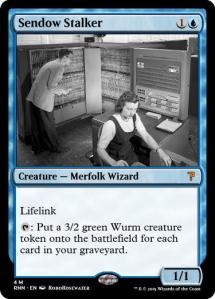
Without further ado, here are some of the generated cards (the image is not generated, the rest is). You can follow the best ones on twitter.

Testing EventStore

I recently came across Event Store, which as its name might hint, is, well, a store for events. The doc says it better than me:

Event Store stores your data as a series of immutable events over time, making it easy to build event-sourced applications.

I wanted to see how useful it would be for us, how it could fit in a Hadoop based platform. This post describes my findings.

Principles

EventStore is thus a database to store events. How is that different from a standard RDBMS, say MySQL? The answers lays in the words Event Sourcing. Basically, a standard database would store the current status of an item or a concept. Think for instance about a shopping cart. If a user adds item A, then item B, then removes item A, the database would have a shopping cart with one element only, A, in it.

If you follow the principles of Event Sourcing, instead of updating the state of your cart, you would instead remember events. User added A. User added B. User removed A. That way, at any point in time you know all the history of your cart. This might help you in many ways: debugging, analysing why product A does not sell so well or even when you have a new great idea, having a lot of relevant data to test it already. You never know which analysis you will want to do in the future. You can read a lot about this, I strongly this post by Martin Kleppman : Using logs to build a solid data infrastructure.

Technology stack and installation

Note: I did use the Linux build, version 3.0.5. The windows build might have less bugs.

EventStore is developed on .Net, and can be built under Mono for Mac or Linux. It is (partly) open source, with some extra tools requiring a licence. Installation is quite easy if you follow the getting started doc. It does look like quite a young project, the only way (for Linux) is to download a .tgz and uncompress it, there is no deb or rpm packages for instance. Inside the tarball, there is no init script, and there are some assumptions in startup scripts (proper chdir before running) which make me feel that the project is built for Windows first, with Linux as an after thought (but it is there), or that the the project is not fully mature yet.

Of course, running under Mono is still a bit worrying. The full .Net framework is not and will be ported, and the legal status of Mono is not fully clear. You might never know what the future will bring.

Managing and monitoring

There is a nice web interface, which is good to have an instantaneous view of your cluster. A dashboard can give you some monitoring information, which can then be accessed via an (undocumented) call to /stats. This will give you a nice JSON object full of information.

Another bug is that the /stats page does need authentication, but will happily return an empty document with a 200 status code if you do not authenticate. This is another proof of lack of maturity.

Data loading

With the HTTP API, it was quite easy. You just need to post some JOSN to an end point. That said, the doc to write events to a stream seems wrong or there is a bug in the version I am using (3.0.5), because EventStore requires a UUID and event type for each event, which can be either passed as part of the JSON, or as part as the header. The first example uses JSON, which did not work at all for me:

HTTP/1.1 400 Must include an event type with the request either in body or as ES-EventType header.

I did have to use a HTTP header. Not a big deal, but that feels like a bad start.

The load was quite slow (8 hours for 1GB JSON), but I cannot say where the time was spent as I only did some functional testing. I was running EventStore one a small virtual machine, with 1 core and 512MB of memory. I never went above 50% CPU usage or 350MB memory. That said, I did have to generate a UUID per event, and that might be slow.

The .Net (tcp) API is said to be much faster. I did not try it, as there are other issues which Event Store which makes it a bad choice for us.

There is a well on github a JVM client. This one is referenced but less described in the doc, and is said to work well up to older versions (3.0.1).

Data fetching

My feeling is that Event Store is mostly to be used as a queue. You have nice ways to subscribe to a stream of event (Atom feed), and add processing to it, via projections, which are javascript snippets. With those projections you can set up simple triggers on events, or build counters. The official documentation is not great, but you can get a list of blog posts going more in depths. Note that projections are considered beta, not to be used in projection.

Simple processing (counters) is quite easy via projections. One place where Event Store shines, is the processing of temporal series. An example is given in some of the blog posts, to analyse the time difference between commit and push per language on github.

There are other APIs (.Net, JVM plus some not officially supported), but they all are about reading a stream of events programatically, without the buit-in ability to do more. Of course, from your language you can do whatever you want.

A big lack to me is that there is no SQL interface. If we want the data to be accessed, we do need some developer time, making it harder for the data analysts. Furthermore, doing joins does look quite tricky.

Oh, and I could not add projections at all, as the web interface does not let me to, for some reason.

Summary

Event Store is not yet for us. The bad points for us are:

  • Mono does not feel safe to use for a major production brick
  • Project seems not mature: errors in documentation, which is as well hard to find. Web UI not fully functional.
  • Data fetching (projections) considered beta and not supposed to be used in production.
  • Other APIs are production ready, but will cost lots of developer time, instead of giving easy access to the data to analysts.
  • No SQL interface.
  • Loads of small bugs here and there.

Of course, I looked at it from the point of view of the guy who will have to maintain it, and develop against it. It has some pretty good points, though:

  • Although it is not well integrated in Linux environments, installation was fairly painless, It just worked.
  • The concepts behind Event Store are very neat
  • It is fairly active on github, I do expect some nice progression